

The Issue
The Celo Ledger app (when using the Celo-specific derivation path) currently does not support signing EIP-712 typed data, which is required for certain operations including:- Signing transactions in Safe multisigs via WalletConnect
- Other dApps that require EIP-712 signature support
- Smart contract interactions that use typed data signing
Important: This issue only affects users using the Celo app with the Celo derivation path (
m/44'/52752'/0'/0). If you’re using the Ethereum app to interact with the Celo network (using the standard Ethereum derivation path m/44'/60'/0'/0), you do not need this workaround as the Ethereum app already supports EIP-712 signing.When You DON’T Need This Workaround
You do not need this workaround if:- You’re using the Ethereum app on your Ledger to interact with Celo (using Ethereum derivation path)
- Your wallet or dApp connects to Celo using the standard Ethereum derivation path (
m/44'/60'/0'/0) - You’re not using the Celo-specific Ledger app
Solution: Using the Eth Recovery App
This workaround is specifically for users who need to use the Celo app with the Celo derivation path but also need EIP-712 signing support. The Eth Recovery app provides the necessary EIP-712 signing capabilities that the Celo app currently lacks.Step 1: Enable Developer Mode in Ledger Wallet
- Open Ledger Wallet on your computer
- Go to Settings → About
- Click 10 times on the Ledger Wallet version number
- A new Developer tab will appear in the settings menu
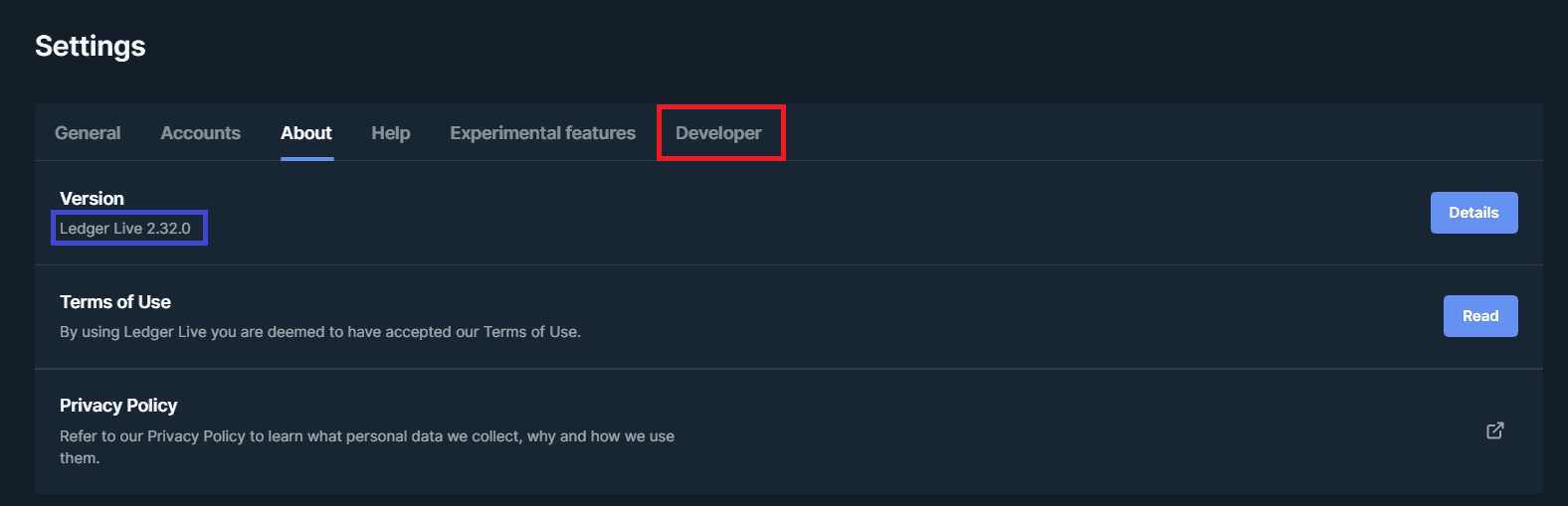
Developer Mode is available in Ledger Wallet version 2.32 and above. If you don’t see the Developer tab appear after clicking on the version number, ensure your Ledger Wallet is updated to the latest version.
Step 2: Install the Eth Recovery App
- Plug in your Ledger device and unlock it
- Go to the My Ledger menu
- Search in the App Catalog for “Eth Recovery”
- If no app is found, check if your Ledger is prompting to upgrade firmware. If so, upgrade and return to step 3
- Click Install to install the Eth Recovery app
The Eth Recovery app requires Developer Mode to be enabled in Ledger Wallet. This is a Ledger feature, not specific to Celo.
Step 3: Sign Transactions Using Eth Recovery
When you need to sign a transaction that requires EIP-712 support (such as Safe multisig transactions):- Connect to your Celo application (Celo Terminal, Safe, etc.) as you normally would
- Instead of opening the Celo app on your Ledger device, open the Eth Recovery app
- Proceed with your transaction signing as normal
Important: Derivation Path Configuration
The Eth Recovery app can sign transactions for any derivation path - it’s your wallet software (Celo Terminal, MetaMask, etc.) that determines which derivation path to use when requesting signatures. If your account was created with the Celo app:- Your address was derived using the Celo path:
m/44'/52752'/0'/0 - Your wallet software must continue using this path when connecting via the Eth Recovery app
- Most Celo-native wallets (like Celo Terminal) will automatically use the correct Celo derivation path
- Check your wallet’s derivation path settings
- Ensure it’s set to use the Celo derivation path (
m/44'/52752'/0'/0) rather than Ethereum (m/44'/60'/0'/0) - In Celo Terminal, the derivation path should be preserved from your original account setup
Tested Configurations
This workaround has been verified to work with:- Celo Terminal: versions 2.5.2 and 2.5.3
- Ledger Hardware: Ledger Nano S on firmware 2.1.0
- Celo App: version 1.3.2
- Safe: multisig transactions via WalletConnect
Technical Background
The issue occurs because the Celo Ledger app’s library (@celo/wallet-ledger) checks for EIP-712 signing capabilities and errors out early if the feature isn’t implemented, rather than returning a random error from the Ledger app itself. The specific method signEIP712HashedMessage is not implemented in the Celo Ledger app.
This was introduced in this commit: developer-tooling@25bf8e3
Why This Affects Only the Celo App
The Celo Ledger app uses a Celo-specific derivation path (m/44'/52752'/0'/0) to generate addresses. This is different from the Ethereum derivation path (m/44'/60'/0'/0) used by the Ethereum app.
- Celo app (Celo derivation path): Does not support EIP-712 signing ❌
- Ethereum app (Ethereum derivation path): Supports EIP-712 signing ✅
- Celo path: Celo-specific optimizations but lacks EIP-712 support
- Ethereum path: Full EIP-712 support but uses standard Ethereum derivation
Troubleshooting
”Eth Recovery app not found”
Make sure you have:- Enabled Developer Mode in Ledger Wallet settings
- Updated your Ledger firmware to the latest version
- Properly connected and unlocked your Ledger device
”Transaction still failing with Eth Recovery app”
Verify that:- The Eth Recovery app is actually open on your Ledger device (not the Celo app)
- Your Ledger device is unlocked and ready
- You’re using a supported version of Celo Terminal or other wallet software
Need Additional Help?
If you continue to experience issues:- Check the Celo Discord for community support
- Review the Ledger Support documentation
- File an issue in the relevant GitHub repository